
其他 2022-04-24 18:51:30 閱讀次數: 0
作者:KaliArch(薛磊),某Cloud MSP服務商產品負責人,熟悉企業級高可用/高並發架構,包括混閤雲架構、異地災,熟練企業DevOPS改造優化,熟悉Shell/Python/Go等開發語言,熟悉Kubernetes、 Docker、 雲原生、微服務架構等。
KubeEye 是一款 Kubernetes 安全及配置問題檢測工具,針對部署在 K8s 集群中的業務應用進行配置檢測使用 OPA,針對集群部署的 Node 使用Node-Problem-Detector進行檢測,同時除瞭係統內置有根據大多數業界常見場景的預定義規則,還支持用戶自定義規則來進行集群檢測。
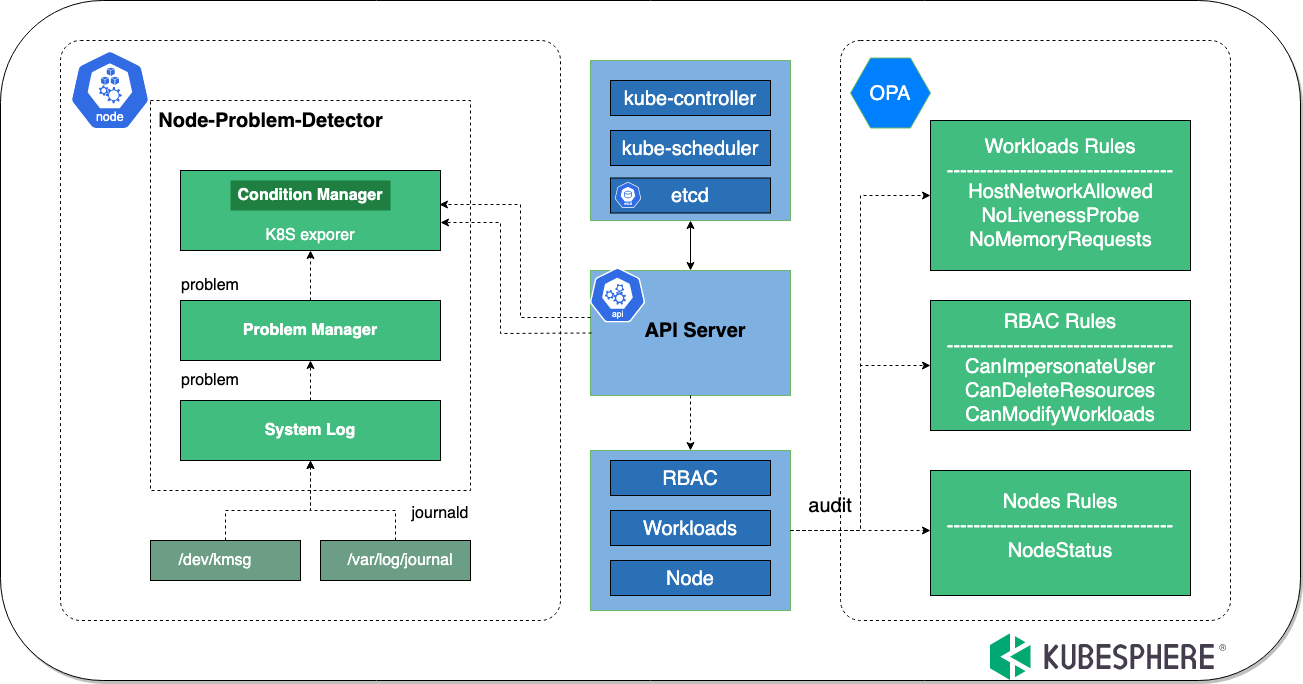
KubeEye 通過調用 Kubernetes API,通過匹配資源中的關鍵字和容器語法的規則匹配來獲取集群診斷數據,詳見架構圖。
其中針對 Node 節點的檢測,需要在被檢測 Node 主機上安裝。
| 是/否 | 檢查項 | 描述 | 級別 |
|---|---|---|---|
| ✅ | PrivilegeEscalationAllowed | 允許特權升級 | 緊急 |
| ✅ | CanImpersonateUser | role/clusterrole 有偽裝成其他用戶權限 | 警告 |
| ✅ | CanDeleteResources | role/clusterrole 有刪除 Kubernetes 資源權限 | 警告 |
| ✅ | CanModifyWorkloads | role/clusterrole 有修改 Kubernetes 資源權限 | 警告 |
| ✅ | NoCPULimits | 資源沒有設置 CPU 使用限製 | 緊急 |
| ✅ | NoCPURequests | 資源沒有設置預留 CPU | 緊急 |
| ✅ | HighRiskCapabilities | 開啟瞭高危功能,例如 ALL/SYS_ADMIN/NET_ADMIN | 緊急 |
| ✅ | HostIPCAllowed | 開啟瞭主機 IPC | 緊急 |
| ✅ | HostNetworkAllowed | 開啟瞭主機網絡 | 緊急 |
| ✅ | HostPIDAllowed | 開啟瞭主機PID | 緊急 |
| ✅ | HostPortAllowed | 開啟瞭主機端口 | 緊急 |
| ✅ | ImagePullPolicyNotAlways | 鏡像拉取策略不是 always | 警告 |
| ✅ | ImageTagIsLatest | 鏡像標簽是 latest | 警告 |
| ✅ | ImageTagMiss | 鏡像沒有標簽 | 緊急 |
| ✅ | InsecureCapabilities | 開啟瞭不安全的功能,例如 KILL/SYS_CHROOT/CHOWN | 警告 |
| ✅ | NoLivenessProbe | 沒有設置存活狀態檢查 | 警告 |
| ✅ | NoMemoryLimits | 資源沒有設置內存使用限製 | 緊急 |
| ✅ | NoMemoryRequests | 資源沒有設置預留內存 | 緊急 |
| ✅ | NoPriorityClassName | 沒有設置資源調度優先級 | 通知 |
| ✅ | PrivilegedAllowed | 以特權模式運行資源 | 緊急 |
| ✅ | NoReadinessProbe | 沒有設置就緒狀態檢查 | 警告 |
| ✅ | NotReadOnlyRootFilesystem | 沒有設置根文件係統為隻讀 | 警告 |
| ✅ | NotRunAsNonRoot | 沒有設置禁止以 root 用戶啟動進程 | 警告 |
| ✅ | CertificateExpiredPeriod | 將檢查 API Server 証書的到期日期少於30天 | 緊急 |
| ✅ | EventAudit | 事件檢查 | 警告 |
| ✅ | NodeStatus | 節點狀態檢查 | 警告 |
| ✅ | DockerStatus | Docker 狀態檢查 | 警告 |
| ✅ | KubeletStatus | Kubelet 狀態檢查 | 警告 |
KubeEye 本身使用 Golang 編寫,可使用編譯好的二進製可執行文件進行相關組件安裝。
免费v2ray节点
wget https://github.com/kubesphere/kubeeye/releases/download/v0.3.0/kubeeye-0.3.0-linux-amd64.tar.gz
tar -zxvf kubeeye-0.3.0-linux-amd64.tar.gz
mv kubeeye /usr/bin/
git clone https://github.com/kubesphere/kubeeye.git
cd kubeeye
make installke
針對集群 Node 主機的檢測,kubeEye 採用Node-problem-Detector ,需要在 Node 主機節點進行安裝,KubeEye 封裝安裝命令,可以進行一鍵安裝。
⚠️註意:這將在你的集群上安裝 NPD,隻有當你想要詳細的節點報告時才需要。
[root@VM-48-7-centos ~]# kubeeye install -e npd
kube-system 	 ConfigMap 	 node-problem-detector-config 	 created
kube-system 	 DaemonSet 	 node-problem-detector 	 created
其主要在 kube-system 名稱空間創建 node-problem-detector-config 的 ConfigMap 和 node-problem-detector DaemonSet。
kubeEye 除瞭可以一次性使用工具運行,同時 kubeEye 也是一個 Operator,可以運行在集群內部,進行長久的持續對集群進行檢測。
kubectl apply -f https://raw.githubusercontent.com/kubesphere/kubeeye/main/deploy/kubeeye.yaml
kubectl apply -f https://raw.githubusercontent.com/kubesphere/kubeeye/main/deploy/kubeeye_insights.yaml
$ kubectl get clusterinsight -o yaml

apiVersion: v1
items:
- apiVersion: kubeeye.kubesphere.io/v1alpha1
  kind: ClusterInsight
  metadata:
    name: clusterinsight-sample
    namespace: default
  spec:
    auditPeriod: 24h
  status:
    auditResults:
      auditResults:
      - resourcesType: Node
        resultInfos:
        - namespace: ""
          resourceInfos:
          - items:
            - level: waring
              message: KubeletHasNoSufficientMemory
              reason: kubelet has no sufficient memory available
            - level: waring
              message: KubeletHasNoSufficientPID
              reason: kubelet has no sufficient PID available
            - level: waring
              message: KubeletHasDiskPressure
              reason: kubelet has disk pressure
            name: kubeeyeNode
[root@VM-48-7-centos ~]# kubeeye -h
KubeEye finds various problems on Kubernetes cluster.

Usage:
  ke [command]

Available Commands:
  audit       audit resources from the cluster
  completion  generate the autocompletion script for the specified shell
  help        Help about any command
  install     A brief description of your command
  uninstall   A brief description of your command

Flags:
  -f, --config string         Specify the path of kubeconfig.
  -h, --help                  help for ke
      --kubeconfig string     Paths to a kubeconfig. Only required if out-of-cluster.
      --master --kubeconfig   (Deprecated: switch to --kubeconfig) The address of the Kubernetes API server. Overrides any value in kubeconfig. Only required if out-of-cluster.
可以看到 KubeEye 目前主要支持兩個命令,一個為 install package 例如 NPD,另外一個執行 audit,對集群應用進行配置掃描。
[root@VM-48-7-centos ~]# kubeeye audit
KIND         NAMESPACE         NAME                                           MESSAGE
Deployment   dddd              jenkins-1644220286                             [NoCPULimits ImagePullPolicyNotAlways NoMemoryLimits NoPriorityClassName NotReadOnlyRootFilesystem NotRunAsNonRoot]
Deployment   jenkins           jenkins-1644220286                             [NoCPULimits ImagePullPolicyNotAlways NoMemoryLimits NoPriorityClassName NotReadOnlyRootFilesystem NotRunAsNonRoot]
Deployment   smartkm-api-k8s   velero                                         [ImageTagIsLatest NoLivenessProbe NoPriorityClassName NotReadOnlyRootFilesystem NoReadinessProbe NotRunAsNonRoot]
DaemonSet    smartkm-api-k8s   restic                                         [ImageTagIsLatest NoLivenessProbe NoPriorityClassName NotReadOnlyRootFilesystem NoReadinessProbe NotRunAsNonRoot]
Node                           minikube                                       [KernelHasNoDeadlock FilesystemIsNotReadOnly KubeletHasSufficientMemory KubeletHasNoDiskPressure KubeletHasSufficientPID]
Event        kube-system       node-problem-detector-dmsws.16d844532f662318   [Failed to pull image "k8s.gcr.io/node-problem-detector/node-problem-detector:v0.8.7": rpc error: code = Unknown desc = Error response from daemon: Get https://k8s.gcr.io/v2/: net/http: request canceled while waiting for connection (Client.Timeout exceeded while awaiting headers)]
Event        kube-system       node-problem-detector-dmsws.16d844532f66703e   [Error: ErrImagePull]
Event        kube-system       node-problem-detector-dmsws.16d84453351b8b19   [Error: ImagePullBackOff]
我們利用命令查看預定義 OPA 檢查規則。
kubectl get cm -n kube-system node-problem-detector-config -oyaml
同時也可以根據自己業務創建自定義檢查規則。
mkdir opa
註意:為檢查工作負載設置的 OPA 規則, Package 名稱必須是 kubeeye_workloads_rego 為檢查 RBAC 設置的 OPA 規則, Package 名稱必須是 kubeeye_RBAC_rego 為檢查節點設置的 OPA 規則, Package 名稱必須是 kubeeye_nodes_rego
package kubeeye_workloads_rego

deny[msg] {
    resource := input
    type := resource.Object.kind
    resourcename := resource.Object.metadata.name
    resourcenamespace := resource.Object.metadata.namespace
    workloadsType := {"Deployment","ReplicaSet","DaemonSet","StatefulSet","Job"}
    workloadsType[type]

    not workloadsImageRegistryRule(resource)

    msg := {
        "Name": sprintf("%v", [resourcename]),
        "Namespace": sprintf("%v", [resourcenamespace]),
        "Type": sprintf("%v", [type]),
        "Message": "ImageRegistryNotmyregistry"
    }
}

workloadsImageRegistryRule(resource) {
    regex.match("^myregistry.public.kubesphere/basic/.+", resource.Object.spec.template.spec.containers[_].image)
}
提示:KubeEye 將讀取指定目錄下所有 .rego 結尾的文件
kubeeye audit -p ./opa
$HOME/.kube/config 文件,如果不存在 K8s config 文件,則無法正常運行。
 免费v2ray节点

 iThome鐵人賽
 看影片追技術